Consumer Trade-In & Diagnostic Mobile Experience
1
Lead Mobile UX Designer
Connected the dots between the technical backend teams, retail stores, and the customer experience to make sure everyone was aligned.
Acted as the customer's voice in high-level strategy meetings, making sure that complex system requirements never made the mobile app confusing or frustrating to use.
2
Mobile Diagnostic Framework
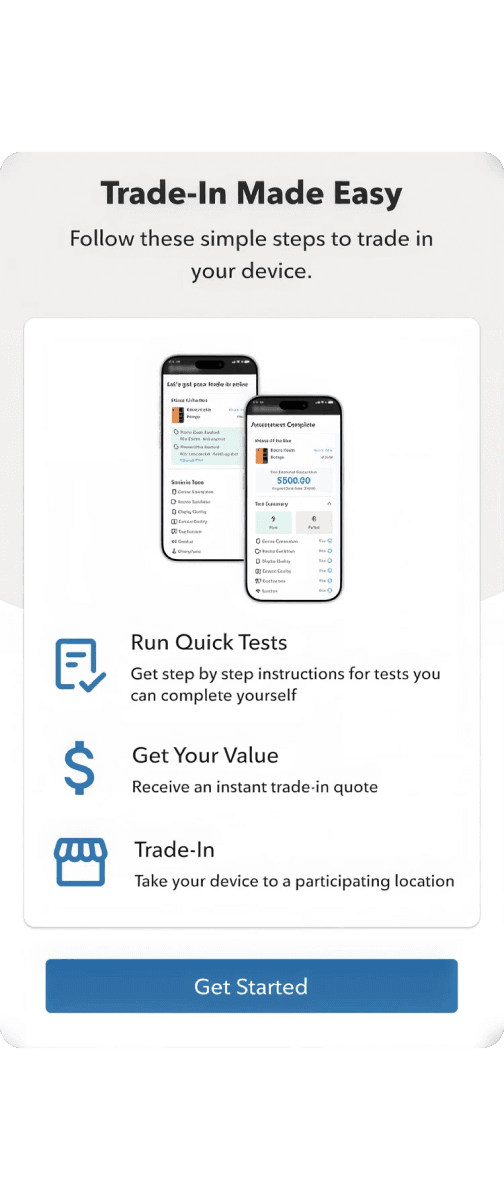
Turned complicated phone tests into easy, interactive tasks for regular customers, like dragging a finger across the screen to check for screen damage.
Removed guesswork by replacing vague, text-heavy forms with step-by-step visual guides that let the phone's hardware verify its own condition.
3
Component-Based Architecture
Created a flexible component system in Figma that allows the layout to automatically adjust to over 100 different phone models.
Made it easy to customize, allowing the core design to be instantly re-colored and re-branded for secondary company brands without starting from scratch.
4
Accessibility & AODA Compliance
Designed for everyone by strictly following digital accessibility standards so users with motor, visual, or hearing limitations can successfully use the app.
Built helpful fallbacks, including full screen-reader support and simple text alternatives for physical actions like shaking or tapping the device.

Discovery & Mobile Architecture
Identity & Security
Designed an intelligent, hard-stop guide that helped users remove personal device locks before mailing their phones, preventing thousands of stuck shipments and massive customer support delays.
Design System & Scalability
Built a flexible, master template system in Figma that automatically adjusted to over 100 phone sizes and could be instantly re-skinned for secondary budget brands with a single click.
Bridging the Gap
Replaced confusing, text-heavy condition questions with clear visual illustrations, making it effortless for everyday users to accurately grade their own screen damage from home.
Interactive Diagnostic Suite
Structured a step-by-step testing journey that ran automated background checks first, preventing users from feeling overwhelmed by only asking for manual interaction when absolutely necessary.
Omni Channel Handoff
Created a seamless QR-code handoff that allowed customers to finish their phone test at home and instantly transfer their progress to an in-store employee, completely skipping the retail wait time.


Mobile App’s Final Output
For the Retail Rep
Scanning this code instantly populated the Trade-in Queue with the diagnostic results I designed in the mobile flow, eliminating the need for the rep to re-test the phone manually.
For the Customer
The app provides an instant, guaranteed trade-in value and clear instructions on what to do next, eliminating any anxiety about the price.
Designing for Data Density
Status Tracking
I designed a simple, colour-coded labeling system (like Awaiting Return, Device Certified, or Recycled/Broken) so warehouse teams can instantly track and match incoming physical shipments with digital orders at a glance.
Filtering Logic
I built a flexible search and filtering tool that allows employees to look up an order using whatever information they have on hand—whether it's a customer's name, an order number, or a tracking ID—slashing customer wait times in physical stores.
The Impact
By replacing old, text-based questionnaires with the automated hardware tests I designed, the project successfully solved major business issues while creating a much smoother experience for customers.
1
More Accurate Pricing
Using the phone's built-in hardware to automatically run tests completely removes human error. This stops a major business problem where customers were promised a high trade-in value at home, only to get a frustratingly lower offer once the warehouse manually inspected the physical phone.
2
Faster Retail Processing
Because customers can complete the heavy lifting of the device diagnostic tests from the comfort of their home, physical retail stores can process trade-ins significantly faster. Employees can simply scan a code, accept the device, and keep the store lines moving.
3
Ready for High-Traffic Launches
The flexible master design template system allows the company to instantly launch this trade-in flow across all their different budget sub-brands. The interface is built to smoothly handle massive traffic spikes during major new flagship phone releases without slowing down or breaking.

Takeaways - Key learnings as a designer
1
The Power of Persistence
This project proved the massive importance of data persistence in enterprise design. Ensuring that a user never loses their progress—especially during multi-step hardware tests—is the absolute best way to build confidence and reduce drop-off.
2
Technical Advocacy
Participating in backend architecture meetings taught me that a Senior UX Designer's job isn't just to design beautiful interfaces. True product advocacy means digging into system constraints to ensure technical workflows support a seamless user experience.
3
Accessibility as a Standard
Designing hardware tests for users with motor, visual, or hearing limitations showed me that inclusive design is never an afterthought. Building accessible software from day one is both a moral responsibility and a core business necessity.
Try Out the Prototype
© Teodoro Studio 2026
Design systems · Product UX · Enterprise tools